How to Use a Teleprompter on Your Phone
 By the TeleP teamUpdated 4 min read
Quick answer
To use a teleprompter on your phone, open a teleprompter app that records while the script scrolls, keep the text at the top of the screen by the front camera, and mount the phone at eye level, an arm's length away. Start slow, then match your voice.
The three ways to prompt on a phone
| Method | What you need | Records while reading? | Best for |
|---|---|---|---|
| Teleprompter app | One phone | Yes | Most selfie videos |
| Browser teleprompter | One phone, any browser | Not on its own | Rehearsing |
| Prompter for another camera | Phone, glass rig, camera | The other camera does | Higher-quality shots |
An app suits most selfie videos: Reels, TikTok, Shorts and YouTube. A browser teleprompter is for rehearsing or for using the phone as a prompter screen. The glass-rig method is for a higher-quality camera or rear-camera shots.
For most people filming themselves, an app is simplest: the script and the camera are in one place.
Step 1: Prepare a phone-friendly script
Phone screens are narrow, so the script needs short lines.
- One idea per line. Long sentences wrap and make your eyes jump.
- Lead with the hook. Short-form video lives or dies in the first line.
- Write like you talk. Contractions, plain words, your own phrases.
- Blank lines between sections remind you to pause.
Check the length with the words-to-time calculator before you record. The script templates include a Reel/TikTok hook format if you are starting from scratch.
Step 2: Keep the text next to the front camera
The front camera is at the top of the phone. The text should be there too.
- Set the text position toward the top of the screen.
- Use a font size you can read from arm’s length, with wide margins so each line has a few words.
- Keep the reading area small, no more than a few lines, so your eyes barely move.
If you film in landscape, the camera ends up on one side. Put the text on that side of the screen.
Step 3: Mount the phone at eye level
Handheld works for quick clips, but a mount looks better and frees your hands:
- A tripod with a phone clamp, or a stack of books with the phone propped against something.
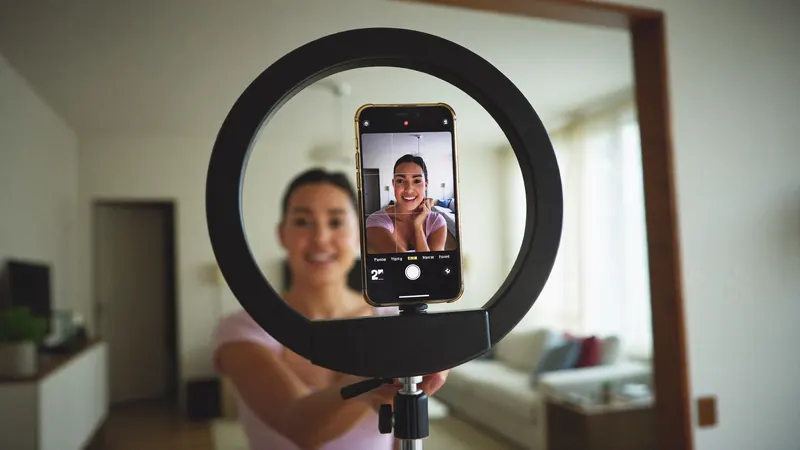
- Lens level with your eyes. A phone below your face films up at you and makes every downward glance obvious.
- About an arm’s length away, framed from mid-chest up for vertical video.
- Light in front of you, such as a window or a lamp behind the phone.
Step 4: Set the speed
Start the scroll slower than you think. Read the first few lines out loud and nudge the speed up until the line you are saying stays near the top of the reading area without you waiting for it.
Not sure where to start? The reading speed test measures your speaking pace in words per minute.
Step 5: Record in short takes
- Use the countdown so you can settle and look into the lens before the text starts.
- Record one section per take: hook, main point, call to action.
- Hold eye contact for a beat at the end of each take so you have a clean cut point.
- If you stumble, pause, go back a line and repeat it. Trim later.
- Watch the first take with sound off and check your eyes. If they visibly drop, move the text higher or step back with a larger font.

Record it on your phone
TeleP scrolls your script over the iPhone camera while you record, then adds captions automatically.
Using TeleP on iPhone
TeleP is our app for iPhone and iPad. According to its App Store listing, it:
- scrolls your script while you record video in real time
- lets you adjust scroll speed, font size and text position
- has a countdown timer
- includes an AI script generator to create or refine scripts
- adds automatic subtitles and captions with adjustable fonts and colors
- can replace or blur your background
- offers layouts for Instagram, TikTok and YouTube
It is a free download with optional subscriptions. If it is not right for you, the best teleprompter app for iPhone comparison lists other options from their own App Store pages.
Using the phone as a prompter for another camera
If you want better image quality from a mirrorless camera, a DSLR or your phone’s rear camera, the phone can be the screen instead:
- Open the free online teleprompter in the phone’s browser and paste the script.
- Lay the phone flat under a pane of glass or acrylic at 45 degrees in front of the camera lens.
- Turn on mirror so the reflected text reads correctly, and raise brightness to maximum.
- Control the scroll with a Bluetooth keyboard or clicker, or use voice-follow scrolling where the browser supports speech recognition.
A phone screen is small for this, so sit close or use a tablet if you can.
Phone teleprompter checklist
- Script in short lines, hook first
- Length checked against your target time
- Text at the top of the screen, next to the front camera
- Phone at eye level, about an arm’s length away
- Light in front of you
- Countdown on
- One section per take, with a beat of eye contact at the end
- Do Not Disturb on, so notifications do not cover the script
Questions and answers
Can I use my phone as a teleprompter while recording?
Yes, with a teleprompter app that records video while the script scrolls. The phone’s built-in camera app cannot show a script, so you need an app that does both, or a second device showing the text.
Is there a free teleprompter for my phone?
Several App Store teleprompter apps are free to download with paid upgrades. Our free online teleprompter also runs in the phone’s browser with no install, which is handy for rehearsing or for using the phone as a display for another camera.
How do I use a teleprompter on Android?
TeleP is iPhone and iPad only. On Android, open our online teleprompter in Chrome to rehearse or to use the phone as a prompter screen, or choose an Android teleprompter app from Google Play.
Where should I look when using a phone teleprompter?
At the text right under the front camera, and up into the lens at the start and end of each point. Keep the text in a narrow column so your eyes do not sweep.
Can I use the rear camera with a phone teleprompter?
The rear camera usually has better quality, but you cannot see the screen while filming. Use a second phone or tablet as the prompter, ideally on a glass rig in front of the lens, with mirror mode on.