How to Use a Teleprompter for YouTube Videos
 By the TeleP teamUpdated 5 min read
Quick answer
To use a teleprompter for YouTube, write the script in short spoken lines, put the text right at the camera lens, and record one section at a time instead of the whole video in one take. Pause between sections, keep the best takes, and cut on the pauses.
Free online teleprompter
Paste your script and read it on camera. Runs in your browser; your script is never uploaded.
Tip: in the teleprompter, press Pop out to keep the script in a small window next to your webcam.
Pick your setup by camera
| You film with | Teleprompter setup | Mirror? |
|---|---|---|
| Phone front camera | App, text by camera | No |
| Laptop or desktop webcam | Browser teleprompter under webcam | No |
| Mirrorless, DSLR or camcorder | Glass rig over the lens | Yes |
| Phone rear camera | Glass rig or second screen | Yes on glass |
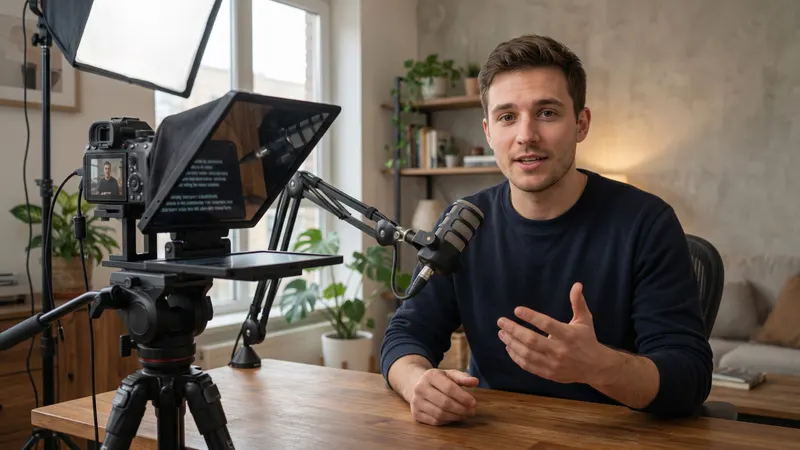
The phone’s rear camera usually gives better quality. With a glass rig, a tablet or monitor sits under the glass in front of the lens; without one, put a second screen right beside the lens. On a webcam, keep the browser teleprompter in a narrow window right under it.
For webcam and glass setups, the free online teleprompter runs in your browser with mirror and flip, a reading line, countdown and keyboard or clicker control.
Write a script built for the teleprompter
A YouTube script that works on a teleprompter is not an essay. It is a set of short, spoken sections.
- Split the video into sections: hook, intro, each main point, any sponsor read, call to action, outro. Put a heading or a blank line between them.
- One idea per line. Short sentences keep your eyes from sweeping.
- Write how you talk. Contractions, your own phrases, no “furthermore”.
- Mark B-roll and on-screen moments in square brackets, so you know where to pause. Start each note with SHOW, CUT, B-ROLL or SLIDE, as in [SHOW SCREEN] or [B-ROLL: office]: our online teleprompter shows those as cues. Any other bracket counts as a blank to fill and triggers a warning, and a line starting with # becomes a section cue.
- Read it aloud once and rewrite every line you trip over.
The guide on how to write a YouTube script covers structure in more detail. To start from a template, the script templates include a YouTube intro that loads straight into the teleprompter.
Check the length
Paste the script into the words-to-time calculator. Conversational speech usually runs about 120 to 150 words per minute (VirtualSpeech), so:
| Video length | Approximate words |
|---|---|
| 1 minute (Short) | 120–150 |
| 5 minutes | 600–750 |
| 10 minutes | 1,200–1,500 |
| 15 minutes | 1,800–2,250 |
Your own pace may differ; the reading speed test measures it.
Set up the shot
- Camera at eye level, or very slightly above.
- Text as close to the lens as possible. On a screen, a narrow window right under or beside the camera. On a glass rig, the text sits over the lens.
- Distance. The farther you are from the camera, the less eye movement shows. With a glass rig or a large tablet, you can sit a couple of meters back with a bigger font.
- Narrow column. Wide margins so each line has 4 to 7 words.
- Reading line near the top, closest to the lens.
- Light from the front. Your eyes need to be visible for viewers to feel eye contact.
Record in sections, not one take
This is the biggest difference between YouTube and a live presentation: you can edit, so use it.
- Load the whole script, but treat each section as its own take.
- Start the countdown, look into the lens, take a breath, then start reading.
- At the end of the section, pause the scroll and hold eye contact with the lens for a beat before you stop. That beat gives you a clean cut point.
- If you stumble, don’t stop recording. Pause, back up a line, and say the sentence again. Cut the mistake out later.
- Do two or three takes of the hook. It matters most and benefits from fresh energy.
Using a keyboard, a presentation clicker or voice-follow scrolling means you can pause, back up and restart without walking to the camera.
Sound like you, not like a script
- Raise your energy a notch above normal. Camera flattens energy; what feels slightly too much often looks right.
- Read a phrase ahead, so you can put emphasis where it belongs.
- Let the speed change. Faster in the hook, slower for explanations and the call to action. Adjust between sections.
- Ad-lib a little. If a better phrase comes to you, say it. The script is a guide.
- Look away briefly at natural thinking moments, then back to the lens.
Editing tips for teleprompter footage
- Cut on the pauses you left between sections. Jump cuts between sections are normal on YouTube.
- Cover cuts with B-roll where you marked it in the script.
- Use punch-ins (a slight zoom on alternate sections) to hide cuts and add movement.
- Watch once with the sound off and look only at your eyes. Trim any moment where you are visibly searching for the line.
Shorts and vertical video
For YouTube Shorts, the script is one tight section: a hook in the first line, one point, and a close. Film vertically on your phone with the text at the top of the screen next to the front camera. A teleprompter app that records while scrolling, with a vertical layout and captions, saves an extra editing step.

Record it on your phone
TeleP scrolls your script over the iPhone camera while you record, then adds captions automatically.
YouTube teleprompter checklist
- Script split into sections with blank lines between them
- Length checked against your target time
- Camera at eye level, text at the lens
- Narrow column, reading line high
- Countdown on; pause control in hand
- Hook recorded two or three times
- A beat of eye contact at the end of every section
- Footage reviewed with sound off before editing
Questions and answers
Do YouTubers use teleprompters?
Many do, especially for explainers, reviews, educational channels and sponsored segments where wording matters. Others use bullet points instead. A common middle ground is a teleprompter for the intro, sponsor read and outro, and notes for the rest.
How do I not look like I'm reading on YouTube?
Keep the text in a narrow column right at the lens, sit or stand farther back with a larger font, read in phrases, and record in short sections so you can reset your energy between them.
Should I record a YouTube video in one take with a teleprompter?
Usually not. Record section by section, pausing a beat before and after each. It is easier to stay natural, and you can pick the best take of each section in the edit.
What teleprompter setup do I need for YouTube?
For phone or webcam videos, a teleprompter on the same screen next to the lens is enough. For a mirrorless or DSLR camera, use a glass teleprompter with mirrored text in front of the lens.
How long should a YouTube script be?
Write to your target length. At roughly 120 to 150 words per minute in conversation, a 10-minute video needs about 1,200 to 1,500 words. Check your script with a words-to-time calculator.