How to Read a Teleprompter Naturally
 By the TeleP teamUpdated 6 min read
Quick answer
To read a teleprompter naturally, shrink the text into a narrow column right by the lens so your eyes barely move, write the script the way you speak, and read ahead in phrases instead of word by word. Control the scroll yourself, pause on purpose, and rehearse.
Free online teleprompter
Paste your script and read it on camera. Runs in your browser; your script is never uploaded.
Why teleprompter reading looks like reading
Viewers spot a teleprompter from three things: eyes that sweep left to right, a flat rhythm with no real pauses, and a voice that rises and falls the same way on every sentence. All three have specific fixes. None of them need expensive gear.
| What viewers notice | Cause | Fix |
|---|---|---|
| Eyes moving side to side | Lines are too wide | Narrow column |
| Eyes looking down | Text is below the lens | Move text under the camera |
| Even, flat rhythm | Word by word, fixed speed | Phrases, pauses, control scroll |
| “Announcer voice” | Written-style script | Rewrite in spoken language |
| Stiff body | Concentrating on the words | Rehearse until the script is familiar |
A narrow column means 4 to 7 words per line. Move the text to the top of the screen, right under the camera. A flat rhythm comes from reading word by word at a fixed speed; read in phrases, pause on purpose and control the scroll yourself.
Fix your eyes first
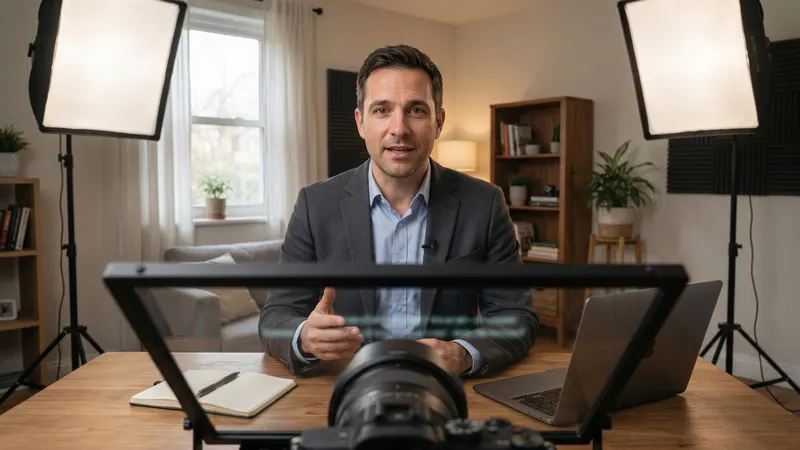
Put the text where the lens is. On a laptop, drag a narrow teleprompter window to the top center of the screen, directly under the webcam. On a phone, keep the text high, next to the front camera. On a camera rig with glass, the text sits over the lens already.
Make the column narrow. Wide margins are the most effective fix there is. If a line holds 4 to 7 words, your eyes travel a short distance that the camera barely registers. In the free online teleprompter, raise the margins and font size until each line is a short phrase.
Move the camera back. The farther you are from the lens, the smaller any eye movement looks. Sitting an arm’s length or more from a laptop, with a larger font, beats sitting close with small text.
Read at a fixed spot. Turn on the reading line, set it near the top, and read only the line at the marker. Your eyes stay in one place and the text comes to you.
How to read a teleprompter without moving your eyes
Your eyes will always move a little. The goal is to make the movement too small for the camera to show. Four settings do almost all of the work:
| Setting | What to do | Why it works |
|---|---|---|
| Line width | 3 to 6 words per line | Eyes scan a few centimeters |
| Reading line | On, near the lens edge | You read one fixed spot |
| Distance | Farther back, bigger text | Smaller angle on camera |
| Speed | Slightly slower than natural | No chasing the text |
Raise the side margins until each line is 3 to 6 words, so your eyes scan a few centimeters instead of the whole screen. Turn the reading line on and set it near the edge closest to the lens: you read at one fixed spot and the text comes to you. Sit farther back and raise the text size to match, so the same eye movement covers a smaller angle on camera. A speed a little slower than your natural pace means you are never chasing text toward the edge of the screen.
In the online teleprompter, these are Side margins, Show reading line, Reading line position, and Text size; press + and − to change the size while it runs.
Then use your peripheral vision. Rest your gaze at the reading line and take in the whole short line at once, rather than tracking word by word. It takes a few practice runs, and it is the same reason to keep lines short: a 4-word line can be read in one glance.
Write for your voice, not the page
A script that sounds natural is one you could have said without a script.
- Use contractions. “We’re”, “you’ll”, “don’t”.
- One idea per sentence. If you need a breath in the middle, it is two sentences.
- Cut written-only words. “Additionally”, “in order to”, “the aforementioned”.
- Use your own phrases. If you always say “here’s the thing”, write it.
- Put pauses in the script. A blank line between ideas tells you to stop. In the online teleprompter, [PAUSE] or [BREATHE] in square brackets shows up as a cue.
Test: read the script aloud once at your desk. Wherever you change a word without meaning to, change the script to match. Your mouth already knows the natural version.
Read in phrases, not words
Strong readers look a few words ahead of what they are saying. That lets you put the emphasis where it belongs before you get there, which is what makes speech sound like thinking rather than reading.
Practice it like this: say a phrase while your eyes are already on the next one. If that feels hard, the scroll is too fast or the font too small. Slow it down, then build back up.
Mark emphasis in the script if it helps. Capitals or a single asterisk on the one word that matters in a sentence (“This is the only setting you need”) reminds you where to lean.
Take control of the pace
A fixed scroll speed forces a fixed rhythm, and a fixed rhythm sounds read. Instead:
- Pause at every section break. Press Space to stop the scroll, look into the lens, and start the next section fresh. A presentation clicker’s forward and back buttons jump through the script in the online teleprompter, which helps when you need to repeat a line.
- Let the hook be faster and the key point slower. Change the speed between sections rather than holding one setting.
- Try voice-follow scrolling. In browsers that support speech recognition, the online teleprompter can follow your voice, so the text waits when you pause and moves when you talk. You set the rhythm instead of the machine.
If you are unsure where to start, measure your pace with the reading speed test and set the scroll a little below it.
Let your face and hands move
When people concentrate on reading, they freeze. Give yourself permission to move:
- Smile on the first line. It changes your tone before you think about it.
- Use your hands as you would in conversation, just keep them inside the frame.
- Nod or tilt your head at the end of a point.
- Glance away briefly at a natural thinking moment, then come back to the lens.
None of this should be scripted into the text. It happens once you stop worrying about the words, which is the point of rehearsal.
Five practice drills
Do these once each before an important recording. Ten to fifteen minutes in total is enough.
- Cold read, then rewrite. Read the script once out loud. Fix every line you stumbled on.
- Talk it without the text. Explain the main points to an imaginary friend with the prompter off. Notice which words you used and borrow them.
- Slow scroll. Run the prompter at a speed that feels too slow. Fill the gaps with pauses and emphasis instead of rushing.
- Phrase ahead. Run it at your normal speed, consciously reading one phrase ahead of your voice.
- Record and watch. Record a 30-second test, watch it with the sound off and look only at your eyes. Then watch with sound and listen only for flat rhythm.

Record it on your phone
TeleP scrolls your script over the iPhone camera while you record, then adds captions automatically.
Quick checklist before you record
- Text in a narrow column at the lens
- Camera at eye level and an arm’s length or more away
- Reading line near the top
- Script rewritten in spoken language with blank lines between ideas
- Emphasis marked on key words
- Pause and speed controls in your hand, or voice-follow on
- Script read aloud at least three times
If your eye contact still looks off after these fixes, the guide to maintaining eye contact with the camera covers camera height, distance and where to look between lines.
Questions and answers
Why do I sound robotic on a teleprompter?
Usually because you are reading word by word at a fixed speed, and the script was written for the eye rather than the ear. Rewrite it in short spoken sentences, read a phrase ahead, and let your pace change instead of matching the scroll.
Can viewers tell when you are reading a teleprompter?
They can if your eyes sweep across a wide line or drop below the lens. With a narrow column placed right at the lens and the camera a bit farther away, eye movement becomes very hard to see.
Should I memorize my script if I'm using a teleprompter?
No, but you should know it. Reading it aloud three or four times before recording means the prompter only reminds you of the next phrase, which is what makes a delivery sound unscripted.
Is it OK to look away from the teleprompter?
Yes, briefly. Glancing down or to the side at a natural thinking moment looks more human than a fixed stare. Just come back to the lens before you start the next important line.
How do you read a teleprompter without moving your eyes?
Make the lines short (3 to 6 words), set a reading line near the lens, sit farther back with larger text, and take in each line in one glance instead of word by word. Your eyes still move, just too little for the camera to show.