How to Maintain Eye Contact With the Camera
 By the TeleP teamUpdated 5 min read
Quick answer
To keep eye contact with the camera, raise the lens to eye level, put anything you need to read directly beside it, and talk to the lens as if it were one person. Look into it at the start and end of every point; brief glances away look natural.
Free online teleprompter
Paste your script and read it on camera. Runs in your browser; your script is never uploaded.
Tip: in the teleprompter, press Pop out to keep the script in a small window next to your webcam.
Why eye contact with a camera is hard
In person you look at someone’s eyes. On camera, their “eyes” are a small lens, usually a few centimeters above the face you are looking at on the screen. When you look at the face, viewers see you looking slightly down. When you read notes in the middle of the screen, they see you looking down and sweeping side to side.
So the fix is mostly about moving things, not willpower: move the lens to your eye level and move whatever you look at closer to the lens.
Set up the camera
Lens at eye level. Stack books under a laptop or use a stand until the webcam is level with your eyes. For a phone, use a tripod or prop it so the front camera is level with your eyes, not your chin.
Distance. Sit about an arm’s length from a laptop webcam. The farther away the lens is, the less a small glance shows. Frame your head and upper shoulders with a little space above your head.
Light from the front. Face a window or put a lamp behind the camera. Viewers read eye contact from your eyes, so they need to be visible, not in shadow.
Move what you look at to the lens
| What pulls your eyes | Where to put it |
|---|---|
| Speaker’s video on a call | Meeting window under the webcam |
| Your notes or script | Narrow teleprompter under the lens |
| Your own preview | Self view off after framing |
| Slides | Second monitor, between points |
| Chat and notifications | Mute or move elsewhere |
Drag the meeting window to the top of the screen, right under the webcam. Turn self view off once you have checked your framing. Put slides on a second monitor and glance at them only between points. Mute chat and notifications, or move them to another screen.
For a script, open the free online teleprompter, make the window narrow and short, and place it at the top center of the screen. Wide margins keep each line to a few words, so your eyes stay in a small area near the lens. On a phone, keep your notes in the top part of the screen next to the front camera.
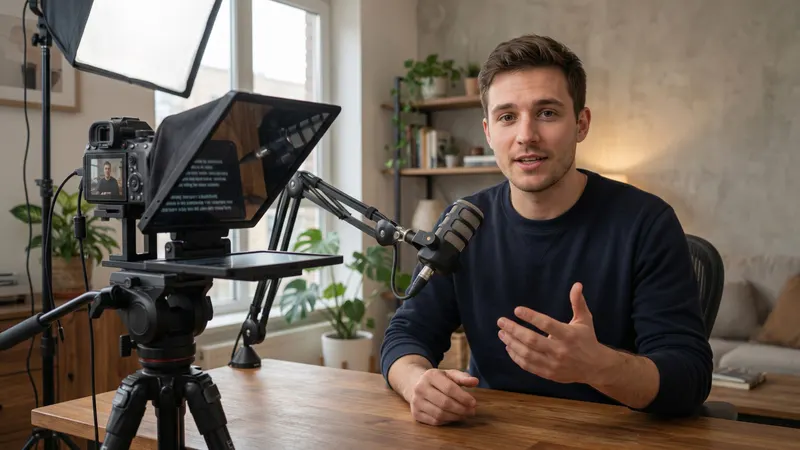
If you need the text exactly over the lens, a glass teleprompter rig does that; the online teleprompter has a mirror setting for it.
Talk to one person
A lens is hard to connect with; a person is easy. Before you start:
- Picture one specific person you would explain this to, and talk to them.
- Some people tape a small photo or sticky note with a face just above the lens. It gives your eyes a target that feels human.
- Smile on your first line. It warms your voice and relaxes your face.
When to look at the lens
You do not need to stare at the lens continuously. Natural eye contact in conversation comes and goes. A practical rule for video:
- Look at the lens for the first sentence of each point.
- Look at the lens for the last sentence of each point, especially a question or a call to action.
- Glance away briefly when you would naturally pause to think. Then come back.
- On calls, look at people while they talk. You can watch reactions, and nobody expects you to stare at the lens while listening.
Practice drills
The two-minute lens talk. Record yourself explaining your job or a hobby for two minutes, no notes, looking only at the lens. Watch it back with sound off.
Read and return. Load a short script into the teleprompter at the top of the screen. Read a sentence, look into the lens for the last few words, then return to the text. Repeat until the movement feels smooth.
The sticky-note test. Put a small sticker just above the lens. Every time you notice your eyes have left it for more than a few seconds, bring them back. It builds the habit quickly.
Watch for the drop. Play back a recording and pause each time your eyes go below the lens line. Note what you were looking at and move it closer to the camera.
Eye contact on a phone
Front-camera recording has the same problem in a smaller space. Hold the phone at eye level, at arm’s length or on a tripod, and keep any text at the very top of the screen, by the camera. A teleprompter app that scrolls the script while you record does this for you.
Common mistakes
Looking at your own face. Self view is the strongest pull on your eyes during a call. Check framing, then hide it.
Notes on a second monitor off to the side. Every glance becomes a head turn. Keep notes on the screen that holds the camera, directly below it.
A camera below your eyes. A laptop flat on a desk films you from below, so even small glances down look like you are avoiding the viewer. Raise it.
Staring without blinking. Trying too hard makes your face tense. Blink, smile and glance away at natural pauses; the goal is to look like you are talking to someone, not to win a staring contest.
Reading full-width lines. If your script spans the whole screen, your eyes sweep visibly. Narrow the column until each line is a short phrase.

Record it on your phone
TeleP scrolls your script over the iPhone camera while you record, then adds captions automatically.
Checklist
- Lens at eye level
- About an arm’s length away
- Light in front of you
- Notes or teleprompter right under the lens, in a narrow column
- Meeting window moved up under the webcam
- Self view off after framing
- Lens at the start and end of every point
For reading a script without it showing, see how to read a teleprompter naturally.
Questions and answers
Why do I look away from the camera without noticing?
Because your instinct is to look at faces, and on a call the faces are in the middle of the screen, below the lens. Moving the window you look at most, or your notes, right under the camera fixes most of it.
Where should I look on a video call?
At the lens when you are speaking, especially when you make a key point. When others talk, it is fine to look at their video, which is where you naturally read reactions.
Is it weird to stare at the camera the whole time?
A fixed stare can feel intense. Look at the lens for each thought, then glance away briefly when you would naturally pause to think, and come back for the next line.
How far should I sit from my webcam?
Roughly an arm’s length works for most laptops. Farther away makes small eye movements less visible; just keep your head and shoulders filling the frame.
Does a teleprompter help with eye contact?
Yes, if the text is placed right by the lens in a narrow column, or on glass in front of it. A teleprompter in the middle of a large screen makes eye contact worse.