How to Use a Teleprompter on TikTok
 By the TeleP teamUpdated 4 min read
Quick answer
To use a teleprompter for TikTok, write a short, hook-first script, load it into a teleprompter app that records vertical video, and keep the text at the top of the screen by the front camera. Record each section as its own take, then add captions and upload.
The workflow in one list
- Write a hook-first script in very short lines.
- Load it into a teleprompter app that records vertical video.
- Put the text at the top of the screen, right by the front camera.
- Mount the phone at eye level.
- Record each section as its own take.
- Add captions, trim and upload to TikTok.
The rest of this guide goes through each step.
Step 1: Write a TikTok script that reads well
A teleprompter makes a bad script obvious. TikTok scripts need to be shorter and punchier than anything else you write.
Structure:
| Part | Job | Length |
|---|---|---|
| Hook | Stop the scroll | One line |
| Setup | Why it matters to the viewer | 1–2 lines |
| Payoff | The tip, story or answer | Most of the script |
| Close | What to do next | One line |
The hook stops the scroll with a claim, a question or a result. The close asks viewers to follow, comment or take the next step.
Rules for the text:
- Lines of 3 to 6 words. A phone screen is narrow.
- Say it the way you would say it to a friend. No formal words.
- Cut every word that isn’t doing work. Read it aloud and remove anything you skip naturally.
- Blank line between parts so you remember to pause and reset.
Example (30 seconds):
Stop reading your script like this.
Your eyes give it away.
Here’s the fix.
Put the text right under the camera.
Make it narrow, three or four words a line.
And step back a bit.
Now your eyes barely move.
Try it on your next video, then tell me how it went.
The script templates include a Reel/TikTok hook format that loads straight into the teleprompter for rehearsal.
Check the length
Conversational speech runs about 120 to 150 words per minute (VirtualSpeech). That puts a 15-second video at roughly 30 to 38 words, 30 seconds at 60 to 75, and 60 seconds at 120 to 150. Paste your script into the words-to-time calculator to check yours.
Step 2: Choose your teleprompter
The phone’s camera has to record while the text scrolls, so you need an app that does both. Look for:
- Recording while the script scrolls
- Adjustable speed, font size and text position
- A countdown
- Vertical output
- Captions, so you don’t need another app
For rehearsing at your desk, the free online teleprompter works in any browser.
Step 3: Place the text and the phone
- Text position: top of the screen, just under the front camera.
- Reading area: a few lines, narrow column, large font.
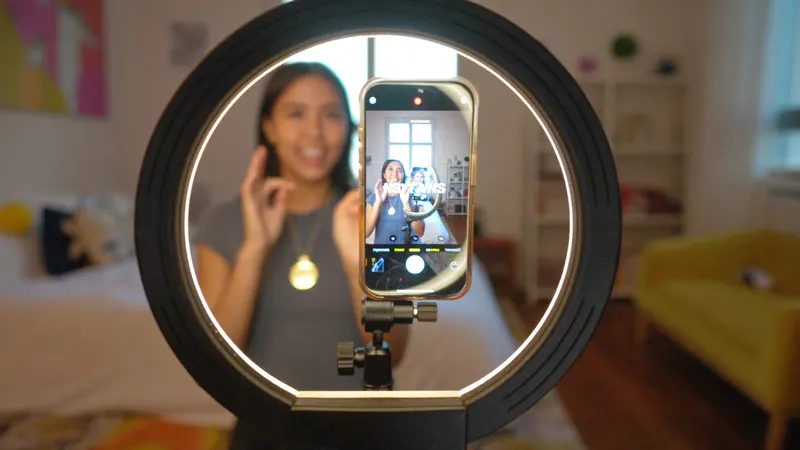
- Phone height: lens at eye level, on a tripod or propped up.
- Distance: about an arm’s length. Farther away makes eye movement smaller, so increase the font size if you step back.
- Framing: vertical, head and shoulders, with room at the top and bottom for TikTok’s on-screen buttons and caption area.
- Light: face a window or put a lamp behind the phone.
Step 4: Record in sections
TikTok viewers are used to quick cuts, so you never need a perfect single take.
- Start the countdown and look into the lens.
- Record the hook two or three times. It decides whether people keep watching.
- Record each following section as its own take.
- Hold a beat of eye contact at the end of each take for a clean cut point.
- If you stumble, pause, back up and repeat the line. Cut it later.
Start the scroll a little slower than you think and adjust after the first take. The reading speed test tells you your natural pace if you want a starting point.
Step 5: Sound natural
- Energy up one notch. The camera flattens it.
- Smile on the hook. It changes your tone.
- Read a phrase ahead so the emphasis lands on the right word.
- Use your hands inside the frame.
- Ad-lib when a better line comes to you; the script is a guide.
Step 6: Edit, caption and post
- Trim the dead space at the start and end of each take.
- Cut takes together on the pauses you left.
- Add captions. Many people watch with the sound off.
- Check the first second. The hook should start immediately, with no pause before it.
- Upload the finished video to TikTok and add your text, sounds and hashtags there.

Record it on your phone
TeleP scrolls your script over the iPhone camera while you record, then adds captions automatically.
TikTok teleprompter checklist
- Script under your target length, hook in the first line
- Lines of 3 to 6 words, blank lines between parts
- Text at the top of the screen, by the front camera
- Phone at eye level, about an arm’s length away
- Hook recorded two or three times
- A beat of eye contact at the end of each take
- Captions added before posting
For more on keeping your eyes from giving you away, see how to read a teleprompter naturally.
Questions and answers
Can I read a script while recording in the TikTok app?
The dependable way, whatever TikTok’s in-app tools offer at the time, is a teleprompter app that records while the script scrolls. You then upload the finished video to TikTok and add sounds, text and hashtags there.
How do TikTokers read scripts without looking at notes?
They keep the script in a narrow strip right under the front camera, read in short phrases, and record in short takes. Jump cuts between takes are normal on TikTok, so nobody has to deliver the whole video in one go.
How long should a TikTok script be?
Write to your target length. At roughly 120 to 150 words per minute in conversation, a 30-second video is about 60 to 75 words and a 60-second one about 120 to 150 words.
Can I use a teleprompter for TikTok Lives?
You need the script on a second device placed right next to the camera, such as a tablet or laptop running a browser teleprompter, since the phone screen is busy with the live.