How to Make a DIY Teleprompter
 By the TeleP teamUpdated 5 min read
Quick answer
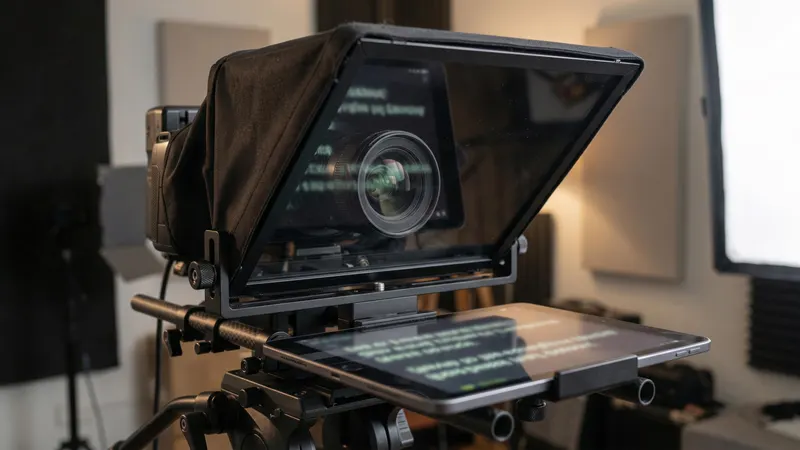
A DIY teleprompter is a phone or tablet lying flat under a clear pane of glass or acrylic angled at 45 degrees in front of the camera lens. The screen shows mirrored text, the pane reflects it to you, and the camera films through it. A box holds it all.
Free online teleprompter
Paste your script and read it on camera. Runs in your browser; your script is never uploaded.
How a DIY teleprompter works
Every glass teleprompter, from a cardboard build to a studio rig, uses the same layout:
- A screen lies flat, face up, below the lens and in front of the camera.
- A clear pane sits above the screen at 45 degrees, leaning away from you toward the camera.
- The camera looks through the pane from behind. It sees you, not the text.
- You look at the pane and see the screen’s reflection, floating right in front of the lens.
Because the reflection reverses the text, the screen has to show it mirrored. Then it reads normally on the glass.
Materials list
| Item | What to use | Notes |
|---|---|---|
| Screen | Phone or tablet | Tablet: larger text |
| Pane | Picture-frame glass or acrylic | Bigger than the screen |
| Body | Box, foam board or wood | Holds the pane at 45° |
| Light shield | Black fabric, card or T-shirt | Keeps the reflection clear |
| Fixings | Tape, hot glue, clips | Holds pane and screen |
| Camera | Camera, webcam or second phone | Lens behind the pane |
| Software | Teleprompter with mirror or flip | Ours has both |
A few notes on the parts:
- Screen: a tablet gives larger text and can sit farther away.
- Pane: slightly bigger than the screen, clean and scratch-free.
- Light shield: stops room light from washing out the reflection and the camera from seeing the box.
- Fixings: tape, hot glue, binder clips or a rubber band hold the pane and keep the screen from sliding.
- Software: our free online teleprompter has both mirror and flip.
Optional: a small tripod or a stack of books to bring the whole rig up to eye level.
Glass or acrylic? Glass is flatter and scratches less. Acrylic is lighter and safer, especially for a rig on a desk with kids or pets around. If you use picture-frame glass, tape its edges so they are not sharp.
Step-by-step build
1. Size the box
Choose a box at least as wide as your screen and deep enough that the pane can lean back at 45 degrees. For a 45-degree pane, the box depth and height should be about the same as the pane’s length divided by about 1.4 (the pane is the long side of a right triangle with equal sides). For a 20 cm pane, that is roughly 14 cm deep and 14 cm tall.
2. Cut the openings
- Back: cut a hole for the camera lens, centered and level with where the middle of the pane will be.
- Front: remove the front face entirely, or cut a large window. This is where you look in.
- Top: leave it open or cut it away so the pane can lean.
3. Mount the pane at 45 degrees
Tape or glue the bottom edge of the pane to the front bottom edge of the box and lean the top back toward the camera hole. Use a square of folded paper as a guide: fold a square diagonally and its fold is 45 degrees. Fix the top edge to the sides with tape or clips.
4. Place the screen
Lay the phone or tablet flat on the floor of the box, screen up, directly under the pane. The top of the text should be at the end nearest you; you will confirm this in the next step.
5. Block stray light
Line the inside of the box with black paper or drape black fabric around the camera and the back of the pane. The camera should see only you through the glass, and the reflection gets much clearer when the area behind the glass is dark.
6. Turn on mirror mode
Open the teleprompter on the screen device, paste your script and enable mirror or flip. Look at the glass from your seat:
- Text backwards left to right: toggle horizontal mirror.
- Text upside down: toggle the vertical flip, or rotate the device 180 degrees.
- Text runs the wrong way: rotate the device so the top of the script is toward you.
7. Set brightness and font
Turn screen brightness to maximum. Increase the font size until you can read it comfortably from where you will sit, and widen the margins so each line holds a few words. Then dim the room light that falls on the glass, not the light on your face.
8. Line up the camera
Look through the camera at the pane. Adjust until the lens is centered behind the glass and you cannot see the box edges in the frame. If the image looks slightly soft or tinted, clean the pane and check that the lens is close to the glass.
Controlling the scroll
You cannot touch a screen that sits inside a box. Options:
- A keyboard or presentation clicker paired with a laptop or tablet. In the online teleprompter, Space plays or pauses and the up and down arrows change speed; a clicker’s forward and back buttons jump through the script.
- Voice-follow scrolling in browsers that support speech recognition: the text moves as you talk.
- A countdown, so you have time to close the box and look at the lens before the text starts.
Troubleshooting
| Problem | Likely cause | Fix |
|---|---|---|
| Faint double text | Plain glass, two reflections | Thicker font, darker background |
| Reflection too dim | Room light on glass | Darken behind pane; brighter screen |
| Camera sees the box | Lens too far away | Move camera closer |
| Text is reversed | Mirror is off | Enable mirror |
| Hard to read | Font too small | Bigger font, narrower column |
| Rig looks down at you | Too low | Raise to eye level |
More detail on the fixes:
- Double text: plain glass reflects from both faces. Beam-splitter glass is a later upgrade if a thicker font and darker background aren’t enough.
- Camera sees the box: move the camera closer to the pane or enlarge the opening.
- Hard to read: the font is too small or the screen too far away. Switching to a tablet also helps.
- Rig too low: raise it with books or a tripod.
When you don’t need a rig
If you film yourself with a phone’s front camera or a laptop webcam, a glass rig is extra work. Put the text on the same screen, right next to the lens, in a narrow column. The how to use a teleprompter guide covers that setup.

Record it on your phone
TeleP scrolls your script over the iPhone camera while you record, then adds captions automatically.
Questions and answers
What angle should teleprompter glass be?
45 degrees between the glass and the screen lying flat below it. That angle reflects the text straight toward your eyes while the camera, behind the glass, looks straight through at you.
Can I use regular glass for a DIY teleprompter?
Yes. A clean picture-frame glass or clear acrylic sheet works. You may see a faint double image of the text, because plain glass reflects from both surfaces. Beam-splitter glass made for teleprompters reduces that, but it is not required for a first build.
Why does the text look backwards in my teleprompter?
Because the glass reflects it like a mirror. Turn on the mirror or flip setting in your teleprompter software so the screen shows reversed text, which the glass then reverses back to normal.
What is the cheapest way to make a teleprompter?
A cardboard box, an old picture frame for the glass, black paper or fabric, tape, and a phone or tablet running a free web teleprompter with a mirror setting. Most people already have everything.
Do I need a teleprompter rig to record on my phone?
No. For selfie video you can show the script on the phone screen right next to the front camera. A glass rig is for when the camera is separate, such as a DSLR, mirrorless camera or a second phone.