Teleprompter for Laptop
 By the TeleP teamUpdated 6 min read
Quick answer
The easiest teleprompter for a laptop is a browser one placed right under the webcam. Open a free online teleprompter, shrink it to a narrow strip at the top of the screen, raise the laptop to eye level and set the speed. It works on Windows, Mac and Chromebook.
Free online teleprompter
Paste your script and read it on camera. Runs in your browser; your script is never uploaded.
Why a laptop works as a teleprompter
Your laptop already has the two parts a teleprompter needs: a camera and a screen right next to it. The only job is to put the words close enough to the lens that your eyes barely move, and to scroll them at your pace.
You do not need special hardware or an install. A browser teleprompter runs on Windows, macOS and ChromeOS in the same way.
Setup in six steps
1. Open the teleprompter in a separate window
Open the free online teleprompter in a new browser window, so you can size and place it independently of your call or recording app. Paste your script. Scripts are saved in your browser only.
Need a script first? The script templates cover presentations, YouTube intros, sales videos and speeches, and load straight into the teleprompter.
2. Make the window small and place it at the lens
In Chrome or Edge, Pop out gives you a small always-on-top window you can drag under the camera, even over a call. Otherwise, size a normal window as below.
| Webcam position | Put the window |
|---|---|
| Top center (most laptops) | Top center, under the camera |
| Below the screen | Bottom center, above the camera |
| External webcam on a monitor | Top center of that monitor |
Size the window to roughly a third of the screen width and a few lines tall.
3. Narrow the column
Inside the teleprompter, raise the margins so each line has 4 to 7 words, and set the reading line at the edge nearest the camera. Short lines mean small eye movements, which the camera barely picks up.
4. Raise the laptop
A laptop on a desk films you from below. Put it on a stand, a box or a stack of books until the webcam is at eye level. Sit about an arm’s length away, then set the font size from that position so you are not leaning in to read.
5. Set the speed
Read the first paragraph aloud. Speed up if you are waiting for words; slow down if you are reading from the edge of the window. To get a starting number, measure your pace with the reading speed test, and check that your script fits your time slot with the words-to-time calculator.
6. Control it without the mouse
- Keyboard: click the teleprompter window once so it has focus. The full list is under Keyboard and clicker shortcuts in the teleprompter’s settings:
| Key | What it does |
|---|---|
| Space | Play / pause |
| Up / Down arrows | Speed ±10 wpm |
| ← → or PgUp / PgDn | Jump back / forward |
| + / − | Bigger / smaller text |
| M | Mirror |
| F | Fullscreen |
| Home | Back to the top |
Speed runs from 40 to 300 words per minute.
- Presentation clicker: most clickers send Page Up and Page Down, so each click jumps the script back or forward. It doesn’t pause it. Use Space (or the clicker’s play button, if it sends a space) to pause.
- Voice-follow scrolling: in Chrome, Edge and Safari, where speech recognition is available, the text moves as you talk and waits when you pause. The browser sends the audio to its speech service (Google’s in Chrome), so use a fixed speed for confidential scripts.
- Countdown: a few seconds to look at the lens before the text moves.
Recording on the laptop
You have two choices:
- Record in the teleprompter. The online teleprompter has optional webcam recording. The video stays on your laptop and you download it as a file.
- Record in another app. Keep the teleprompter window under the camera and record in your usual app at the same time.
For live calls on Zoom, Teams or Meet, see how to use a teleprompter on Zoom for window layout and screen-sharing tips.
Add-ons that help
| Add-on | Fixes | Cost |
|---|---|---|
| Laptop stand or books | Camera looking up | Free to low |
| External webcam | Poor built-in camera | Medium |
| Presentation clicker | Reaching for the keyboard | Low |
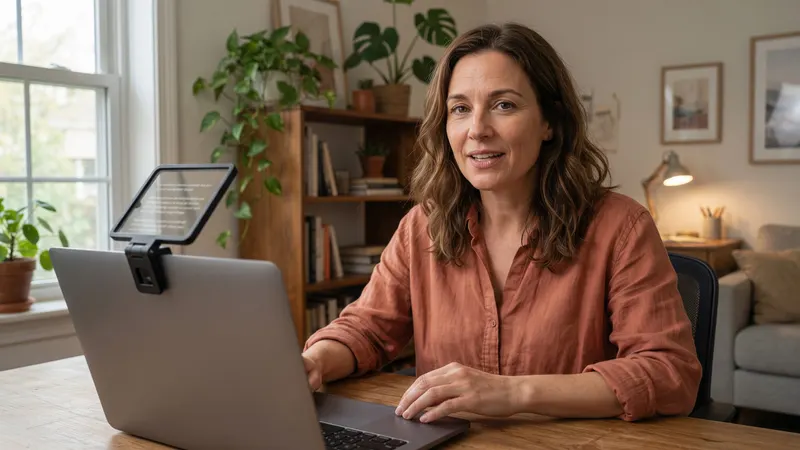
| Phone or tablet under webcam | Frees the laptop screen | Free if owned |
| Front light | Eyes in shadow | Free to low |
| Glass rig with mirror | Text over the lens | Medium, or DIY |
Make a DIY laptop teleprompter
A browser window under the webcam is enough for most calls and videos. If you want the text directly over the lens, so your eyes don’t move at all, you can build a simple rig at home. There are two versions, depending on your camera.
Version 1: phone strip under the built-in webcam (no build)
Good for calls, where you can’t move the camera.
- Open the online teleprompter on your phone and paste the script.
- Turn the phone sideways and set large text with wide margins, so only a few words show per line.
- Clip or tape the phone to the top of the laptop screen, as close below the webcam as you can without covering it. A small phone clip or a binder clip works.
- Control it with the phone’s on-screen buttons, or a clicker paired with the phone.
The laptop screen stays free for the call, and the text sits an inch or two from the lens.
Version 2: glass box for an external webcam
Good for recorded videos. Your eyes look straight through the text into the lens. You’ll need:
- An external USB webcam (built-in laptop cameras can’t sit behind glass)
- A clear pane from a picture frame, or a sheet of clear acrylic
- A cardboard box a little larger than the pane
- Black paper or cloth, and tape
- A phone or tablet to show the script
Build it:
- Cut the front and back off the box, so it becomes a tunnel.
- Tape the glass inside at 45 degrees, with the top edge leaning toward you.
- Lay the phone or tablet flat on the bottom of the box, under the glass, screen facing up.
- Put the webcam behind the box, looking through the glass at you. Line black paper around the camera opening so the lens only sees through the glass.
- On the phone or tablet, open the online teleprompter and turn on Mirror text. The glass reverses the reflection, so the text reads normally. If it appears upside down, also turn on Flip text upside down.
- Select the external webcam in your recording or call app.
The laptop runs the recording; the phone under the glass is the prompter. You’ll see a faint double image with ordinary glass because both surfaces reflect. That’s normal for a first build. Teleprompter beam-splitter glass reduces it.
Common laptop problems
The call window covers the script. Shrink the call window and move it to the bottom half of the screen, or onto a second monitor.
Keys don’t work. The teleprompter window must have focus. Click inside it once before you start.
Eyes visibly drop. The window is too low or too wide. Move it up and narrow the column.
Script shows when you share. Share a specific window or tab, not the entire screen.
Text is hard to read from a distance. Raise the font size and widen the margins at the same time, so lines stay short.
Would a phone be easier?
If you record short vertical videos, a phone is often simpler than a laptop: the camera, script and vertical frame are all in one device. TeleP for iPhone and iPad scrolls your script while you record, with speed and font controls, a countdown, automatic captions and layouts for TikTok, Instagram and YouTube.

Record it on your phone
TeleP scrolls your script over the iPhone camera while you record, then adds captions automatically.
Laptop teleprompter checklist
- Teleprompter in its own browser window
- Window at the camera edge, narrow, 4 to 7 words per line
- Webcam at eye level, about an arm’s length away
- Speed tested on the first paragraph
- Keyboard, clicker or voice-follow ready
- Countdown on
- Sharing a single window in calls
- Notifications off
Questions and answers
Can I use my laptop as a teleprompter?
Yes. Open a browser teleprompter in its own window, resize it to a narrow strip and move it right under the webcam. Your eyes stay close to the lens, so viewers see you looking at them.
What is the best free teleprompter for Windows laptops?
A browser teleprompter needs no install and runs in Chrome or Edge on Windows. Our online teleprompter offers speed control, mirror and flip, countdown, keyboard and clicker control, voice-follow scrolling where supported, and optional webcam recording that stays on your device.
How do I keep viewers from seeing my script on a laptop?
Run the teleprompter in a separate window and share only a specific window or tab in your call, not your entire screen.
Do I need a teleprompter mirror for a laptop?
No. A mirror or beam-splitter glass is only needed when the text has to sit directly in front of a separate camera lens. For a laptop webcam, a narrow window just under the camera is enough.
My laptop camera is below the screen. What do I do?
Put the teleprompter window at the bottom center of the screen, just above the camera, or use an external webcam on top of the screen. The rule is the same: text as close to the lens as possible.
How do I make a DIY teleprompter for a laptop?
Use an external webcam behind a clear pane of glass or acrylic set at 45 degrees in a cardboard box. Lay a phone or tablet flat under the glass running a web teleprompter with mirror turned on, and the camera films through the reflected text.