How Does a Teleprompter Work?
 By the TeleP teamUpdated 4 min read
Quick answer
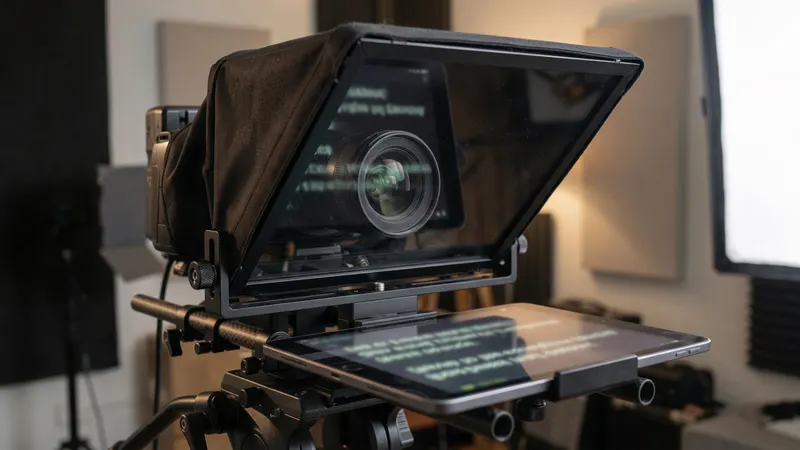
A teleprompter shows your script on a screen and scrolls it at your speaking pace. In a camera rig, the screen lies under angled glass that reflects the text toward you while the camera films through it. On phones and laptops, the text sits beside the lens.
Free online teleprompter
Paste your script and read it on camera. Runs in your browser; your script is never uploaded.
The parts of every teleprompter
Whatever its size, a teleprompter has four parts:
- A script, formatted in short lines with large text.
- A display, which can be a monitor, tablet, phone or laptop screen.
- Software that scrolls the text, sets its size and speed, and mirrors it if needed.
- A control: an operator, remote, keyboard, foot pedal or voice-following software.
What changes between teleprompter types is where the display sits relative to the camera lens.
Type 1: Camera-mounted glass teleprompters
This is the type you see on news sets and film productions.
- The display lies flat below the lens, facing up.
- A pane of beam-splitter glass sits above it at 45 degrees.
- The glass reflects the display’s light toward the speaker, so the text appears to float in front of the lens.
- The camera, behind the glass, looks straight through it at the speaker.
- A hood, usually black fabric, surrounds the lens and the back of the glass so no stray light reaches the camera.
Because the reflection reverses the image, the software shows the text mirrored on the display. After the reflection it reads normally.
The result is the main reason teleprompters exist: the speaker reads while looking straight into the lens, so viewers see direct eye contact.
The glass is not an ordinary mirror; it is partly reflective. Teleprompter glass explained covers beam-splitter ratios, plain glass and acrylic.
Type 2: Presidential or conference prompters
On a stage there is no camera to look through, but the speaker needs to look at the audience.
- Two clear panes stand on poles to the left and right of the lectern.
- A display at the base of each pane reflects the text up onto it.
- From the audience side the panes look like clear glass.
- The speaker turns between the two panes, which looks like addressing different parts of the room.
Some events also use a large confidence monitor at the back of the room or on the floor in front of the stage: a plain screen with the script or slides, without glass.
Type 3: On-screen teleprompters (phones, tablets and laptops)
For webcam and phone video, there is no glass at all. The text scrolls on the same screen that has the camera, as close to the lens as possible.
- On a phone, a teleprompter app scrolls the text at the top of the screen next to the front camera while it records.
- On a laptop, a browser teleprompter in a narrow window right under the webcam does the same job.
- On a tablet, the large screen allows a bigger font, so you can sit farther away and eye movement shows less.
The trade-off is that the text sits next to the lens rather than over it. A narrow column of 4 to 7 words per line and a little distance from the camera make that gap very hard to notice. You can try this setup now with our free online teleprompter.
How the scrolling is controlled
| Control | How it works | Typical use |
|---|---|---|
| Operator | Second person adjusts speed live | Broadcast TV, big events |
| Hand remote or clicker | Speaker controls with buttons | Solo shoots, presentations |
| Foot pedal | Speaker’s foot controls speed | Hands-free studio work |
| Keyboard | Space and arrow keys, or similar | Laptop and desktop setups |
| Voice following | Speech recognition follows your place | Solo creators, natural pace |
| Fixed speed with countdown | Countdown, then set speed | Short takes, simple setups |
An operator watches the speaker and adjusts the speed live. With a remote or clicker, the speaker pauses, speeds up or jumps with buttons. Voice following uses speech recognition to track where you are in the script and scrolls to match. A fixed-speed setup starts the text after a countdown at a speed you set.
The online teleprompter on this site supports keyboard and presentation-clicker keys, a countdown, and voice-follow scrolling in browsers where speech recognition is available.
What the software does
Teleprompter software handles more than scrolling:
- Speed in fine steps, changeable mid-take
- Font size, line spacing and margins, so lines stay short and readable
- Mirror and flip for glass rigs
- A reading line or arrow showing where to read
- Countdown before the text moves
- Script storage, so you can reopen and edit scripts
Some apps also record video while the script scrolls, which is the simplest option for solo phone video.

Record it on your phone
TeleP scrolls your script over the iPhone camera while you record, then adds captions automatically.
Do you need a glass teleprompter?
| You film with | You need |
|---|---|
| Phone front camera | App with text by camera |
| Laptop webcam | Browser teleprompter under webcam |
| Separate camera | Glass rig with mirror mode |
| Live stage talk | Presidential-style panes or a confidence monitor |
A separate camera means a mirrorless, DSLR or camcorder; the glass rig needs a display under it with mirror mode on. On a laptop, keep the browser teleprompter in a narrow window right under the webcam.
If you want a glass rig without buying one, it can be built from a box, a picture-frame glass and a tablet using everyday materials.
Questions and answers
How does a teleprompter work without the camera seeing the words?
The screen faces up, not toward the lens, and the angled glass reflects its light toward the speaker. The camera looks through the glass from behind, where the area is kept dark, so it records the speaker but not the text.
Who controls the speed of a teleprompter?
Either an operator who follows the speaker’s pace, or the speaker themselves with a remote, keyboard, foot pedal or voice-following software. Solo creators usually control it themselves.
Why is teleprompter text mirrored?
A reflection reverses an image. The software flips the text on the screen so that, once reflected by the glass, it reads normally.
How do politicians use teleprompters on stage?
Speeches on stage often use presidential-style prompters: two clear panes on stands to the left and right of the lectern, each reflecting a screen at its base. The audience sees clear glass while the speaker reads the text and turns naturally between the two.
Can a phone be a teleprompter?
Yes. A teleprompter app scrolls the script next to the front camera while it records, or a phone can serve as the screen under a small glass rig for another camera.